
The Ultimate Guide: What is IPTV and How Does It Work in 2026?
Everything you need to know about Internet Protocol Television — from core streaming protocols and hardware decoders to setup tutorials and privacy essentials.
Understanding What is IPTV and Its Core Fundamentals
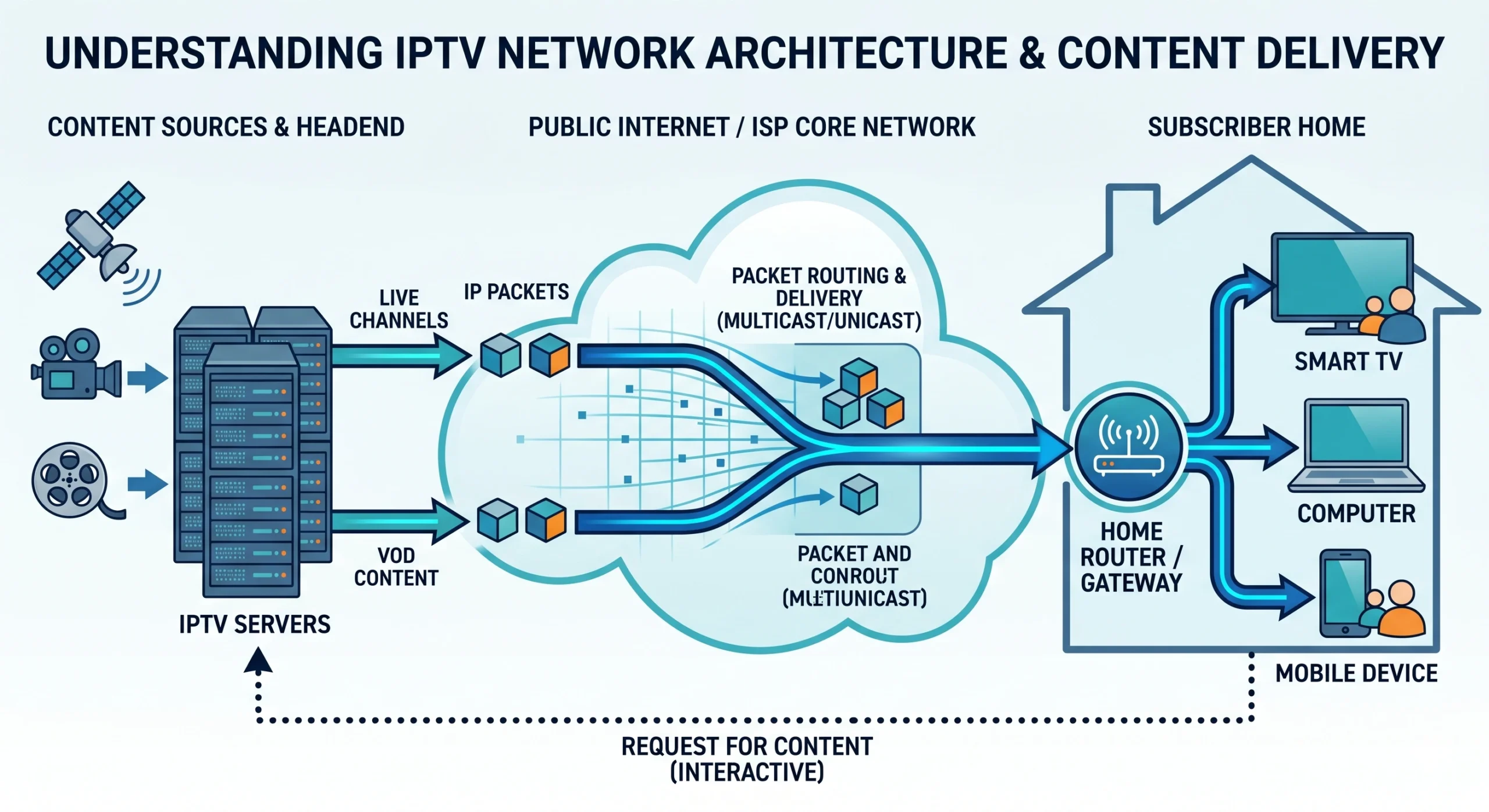
Unlike traditional satellite dishes that pick up microwave radio signals from geostationary orbit, or coaxial copper cables laid under city streets, IPTV (Internet Protocol Television) streams media packets directly using standard internet TCP/IP routing.
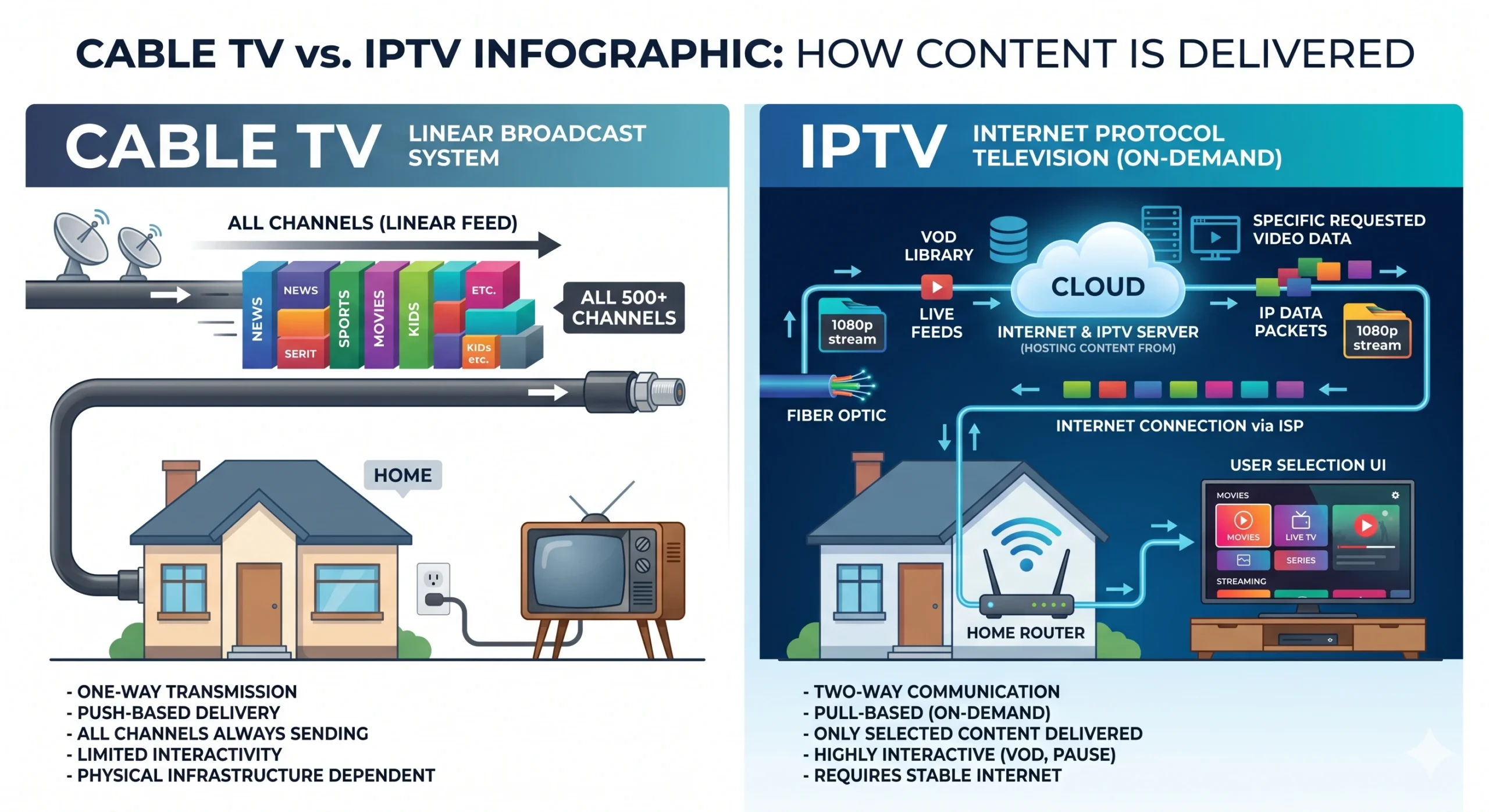
In traditional broadcasting, every channel is transmitted simultaneously to your home regardless of whether your TV is on. With IPTV, content is sent on-demand: when you select a channel, a dedicated unicast or multicast data stream is opened between the hosting server cluster and your viewing device.
IPTV vs. Traditional Cable: How the Architecture Compares
The diagram below highlights the structural difference between legacy broadcast delivery and modern internet packet distribution:
The Three Primary Formats of IPTV Media
1. Live Television
Real-time broadcasting of live sporting events, breaking news, and linear television networks. Feeds are synchronized using low-latency HLS (.m3u8) or MPEG-TS chunk streaming.
2. Video On Demand (VOD)
Searchable, playable on-demand libraries of movies and television series. Users can pause, fast-forward, rewind, and choose audio tracks and subtitles.
3. Time-Shifted TV (Catch-Up)
Enables subscribers to replay shows broadcast over the last 3 to 7 days directly from the interactive EPG timeline without needing a DVR or hard drive.
How to Get Started: What Equipment Do You Need?
- 1A Capable Streaming Device: We recommend the Amazon Fire TV Stick 4K Max, Nvidia Shield TV Pro, or Apple TV 4K.
- 2A Reliable IPTV Subscription: High-bandwidth servers with dedicated anti-freeze infrastructure such as British IPTV Pro or CastVera.
- 3A Dedicated Player App: Software like TiviMate IPTV Player, IPTV Smarters Pro, or IBO Player to organize your M3U and EPG feeds into an intuitive TV guide.
- 4A High-Speed VPN: To mask your traffic from domestic ISP throttling during live football and combat buffering.
Frequently Asked Questions
What does IPTV stand for?
IPTV stands for Internet Protocol Television. It delivers television programming and video content using the TCP/IP suite over the internet, rather than through traditional terrestrial broadcast, satellite signal, or cable television formats.
How is IPTV different from OTT streaming like Netflix or Prime Video?
While both use the internet, OTT services like Netflix or Disney+ operate purely on a closed video-on-demand (VOD) catalog. IPTV emulates traditional television infrastructure, offering thousands of scheduled live linear channels, electronic program guides (EPG), and live pay-per-view broadcasts alongside VOD libraries.
What are M3U playlists and Xtream Codes?
An M3U playlist is a plain text file containing URLs pointing directly to live stream transport feeds (.ts / .m3u8). Xtream Codes is an API protocol that organizes those streams with server hostnames, usernames, passwords, and automated EPG/VOD categorization.
Can I watch IPTV on my regular Smart TV?
Yes. Smart TVs running Android TV, Google TV, Samsung Tizen, or LG webOS can run IPTV player applications such as IPTV Smarters Pro, IBO Player, SmartOne IPTV, or TiviMate.